Archive for the ‘Search Engines’ Category

Searching Linkedin endorsements? Forget about it

endorsed for_1

A strange thing happened on the way to (once again) reviewing the search engine functions at Linkedin.com. First, when Linkedin introduced the feature “Skills and Expertise” I was put off, and even deleted them! I much prefer the personal recommendations. Those actually give you information that may help in making an informed decision. But, you can’t outrun fate so, I just ignored it. Since I get endorsements, many from people I don’t know, I began to get curious about any advantage they may have. Well, after review, I can report that the “endorsed for” feature is useless.

Whether you search from a general search engine or within Linkedin you will not be able to leverage that part of a profile. Say, I want potential clients to find me with a search query: “endorsed for” “private investigations” near a particular zip code. The only way those terms will appear is if they are in the “Background” portion of your profile — findable by searching in the “keywords” box in the advanced tool.

Even the stock categories of skills at the Linkedin Skills page doesn’t give you the minimal option of tailoring it to geographic region — although there is a graph from which you can select one. But to make matters worse, all the individuals endorsed for a specialty do not appear in the results and even among the profiles listed all the geographic regions aren’t represented in the graph!

Then again, maybe you don’t want to be associated with Linkedin’s title for your endorsed skill category.

cheating

You can find keywords in status updates through the Linkedin tool, Signal, but this just searches words in status updates and doesn’t support phrase searching. The word “Endorsed” returns a result for someone who doesn’t want to be.

Signal_unwanted endorsement_last image

Did I miss anything? Signed, Not Buying It.

Dynamic Internet searching with Google products

Check out the results from these search queries to get a sense of the dynamics of Internet search in retrieving known information about your subject from search engines. We know that the same query on Google web, news and archive news products will return different links. But also, even if your query phrases are in the text of a result, that link won’t necessarily be returned. I started a Google web search with the phrase “securities dealers” and one link caught my eye, a 1963 news report that mentioned “Harry N. Geisler,” so I made him my subject and did a reverse search to see if I could retrieve the same news report. You can identify relevant terms from the story to tailor your search.

securities discipline
securities discipline_result

The name Harry N. Geisler from the St. Petersburg Times is buried deep in the report. If you web search “Harry N. Geisler” you won’t get this article.

securities discipline_St Pete

A web search with the combination: “National Association of Securities Dealers” “florida” “geisler” shows over 1600 entries. The first result is a Florida paper with his 1993 obituary, which doesn’t mention the securities disciplinary action. There’s no mention of our subject in the next 100 links. But a Google news archive search results in one relevant hit, a New York Times article, which names him as Harvey, not Harry Geisler. The mention of Geisler is on page 48, which you only find by scrolling through the article.

nat assoc Geisler results

NYT_Geisler_page 48

Then, searching “harvey n geisler” in Google web will get you to an SEC report on the disciplinary action.

SEC heading
Geisler dismissed

But then there’s more. When you conduct the same search in Google news archive a result points to another way to form the name: “HN Geisler”, and to continue your digging.

[If you "Like" or + it, share with your favorite service!]

Searching Craigslist postings

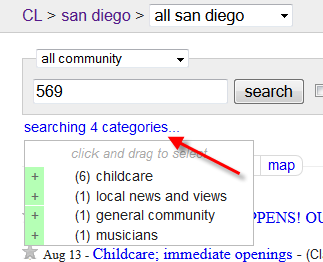
Craigslist has added a mapping feature that plots the location and displays a popup box of the listings you’ve searched. Query terms that appear within Craigslist housing offerings and view the location on a map. You can search by any term that appears in the ad, or by town, street or zip code to identify all the housing in the area. This image shows the listing I searched by telephone number. The mapping feature was also displayed in New York for items for sale, personals and community.

Retrieving full LinkedIn profiles

How do you view full profiles of 3rd degree connections now that LinkedIn has blocked those to users of the free service?

You’ve encountered the problem of selecting a profile from Google (or within LinkedIn) of a person you’re not connected to that shows only a first name and the initial of the last name. Selecting the links takes you to this view of the profile.

You’ll get more details on this profile when you view it as a pdf.

But that’s only a taste, not the full meal. Extract the first name and particular text that will likely return the right profile and enter your search terms at Bing or Yahoo (not Google). Now the full name is visible. (For another approach see this post from Glen Cathey, an expert LinkedIn searcher.)

Two versions of the profile can be viewed from this screen: the one from the active link and the cached one. Select the cached link to view an older page of the profile. This image is just a portion of the page.

Preserve the page with your favorite web capture program. But there’s more. However, if you click on the active link from the search engine you’re taken to the limited public view.

Go to the advanced search screen within LinkedIn. (The link is on the right side of the search box.) Enter the first and last name and the company or keywords that you found in the limited or cached profile. Select the name link and view the full profile. In my example, the full current one includes the “Recommendations” section, which wasn’t in the cached version.

Will you share this post with your preferred social network?

The best databases for social media searches

Finding a social network presence is more a matter of technique applied than the “best” aggregator used. Spokeo.com sweeps many sites to find profiles but these are only the public profiles and not all of those are returned. Even if you know the user’s email address it may not get you to the sites where your person has a presence. You may have to go directly to the social network to identify the profiles that are not searchable through another application or search engine. Other obstacles present themselves: full names are not listed or the social network blocks search engine indexing. Even within the Facebook search feature, users can specify whether they want their profiles to be found.

What’s a private investigator to do?

- Identify the major social networking sites

- Familarize yourself with their search features (see “Search”)

- Search by former email addresses and “handles” they’ve used, which could be prefixes to common web-based email, and combine with various popular sites (i.e. gmail.com)

- Enter the email addresses into the Google search box in quotation marks.

- There are lots of ways to search names through the common search engines: combine them with business names, known locations, personal interests, associates and relevant events. Here’s one example:

parker-twitter

- Try less common search engines:

duckduckgo

Pipl.com returns a lot of “sponsored” results (advertising) – which direct you to fee-based sites. But it does search some free sites — RateMyProfessors.com is one — that Spokeo doesn’t.

I found Yasni.com better at directing me to the correct Facebook profile, but not more so than going directly through the Facebook search engine. It also searches Amazon Wish Lists and Google Blogs.

Vary your name searches in the Facebook.com search engine: switch first and last names, search with and without limiting it to location or education and add middle or alternative names. Women will also combine former married names or birth names with a current last name. The indirect approach is sometimes more effective: look up the names of your person’s friends, family and colleagues.

The social media site Tagged.com lists first name and last name initial in the name search results, even if you’ve entered the full name.

gloria-tagged

You might be able to confirm the full name at another site. (Did you notice that we snagged a photo at the Tagged site but one wasn’t in the Facebook profile?)

gloria-FB

Will you share this with your preferred social network?

Private Investigator Research Links – Feb 2012

The rest of my favorite links are here.

Editors
Recent Comments
Sponsors
Tools
Newsletter
Newsreader Feed
Sponsors
Sponsors